
Synopsis
Generates a report on Azure resource utilization or idle time for specified Resource Groups with error logging.
- Synopsis
- Description
- Get-AzureResourceReport.ps1 (Powershell 7+)
- Get-AzureResourceReport.ps1 (Powershell 5.1+)
Description
This script retrieves metrics (CPU, network) from Azure Monitor for Virtual Machines, App Services, or SQL Databases,
allowing users to filter by resource type, limit results, and choose between utilization or idle time reporting.
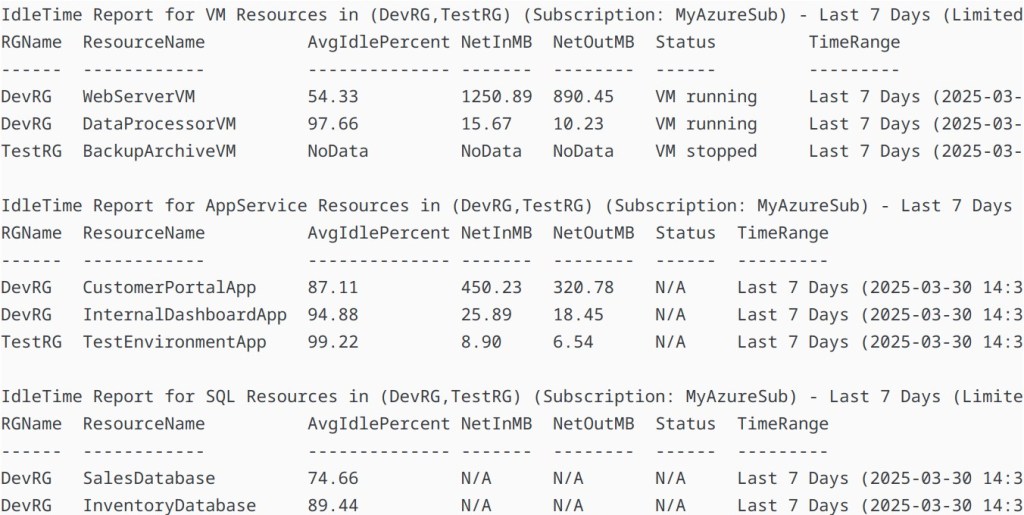
Output can be displayed in the console or saved to CSV with a summary. Errors (e.g., authentication, permissions)
are logged to a timestamped file. Requires Azure Monitor Metrics (enabled by default) but does NOT require Log Analytics.
Get-AzureResourceReport.ps1 (Powershell 7+)
<#
.SYNOPSIS
Generates a report on Azure resource utilization or idle time for specified Resource Groups with error logging.

.DESCRIPTION
This script retrieves metrics (CPU, network) from Azure Monitor for Virtual Machines, App Services, or SQL Databases,
allowing users to filter by resource type, limit results, and choose between utilization or idle time reporting.
Output can be displayed in the console or saved to CSV with a summary. Errors (e.g., authentication, permissions)
are logged to a timestamped file. Requires Azure Monitor Metrics (enabled by default) but does NOT require Log Analytics.

.PARAMETER ResourceGroupName
A comma-separated list of Azure Resource Group names (e.g., "RG1,RG2").

.PARAMETER SubscriptionName
The Azure subscription name to query.

.PARAMETER TimeRangeDays
Number of days to analyze (default: 30).

.PARAMETER ResourceType
Type of resource to report on: "VM", "AppService", "SQL", or "all".

.PARAMETER LimitPerType
Number of resources per type to include, or "all" (default: "all").

.PARAMETER ReportMode
Report mode: "Utilization" (CPU usage %) or "IdleTime" (100% - CPU usage %) (default: "Utilization").

.PARAMETER OutputToCsv
Path to save the report as CSV (e.g., "C:\Reports\Report.csv"), or $false for console output (default: $false).

.PARAMETER ErrorLogPath
Directory to save error logs (default: script directory).

.PARAMETER Parallel
Switch to enable parallel processing of Resource Groups (requires PowerShell 7+).

.EXAMPLE
# Basic console report for VMs in a single RG
.\Get-AzureResourceReport.ps1 -ResourceGroupName "DevRG" -SubscriptionName "MySub" -ResourceType "VM"
Displays utilization for all VMs in DevRG over the last 30 days in the console.

.EXAMPLE
# CSV report for one VM per RG with idle time
.\Get-AzureResourceReport.ps1 -ResourceGroupName "DevRG,TestRG" -SubscriptionName "MySub" -ResourceType "VM" -LimitPerType 1 -ReportMode "IdleTime" -OutputToCsv "C:\Reports\IdleVMs.csv"
Saves an idle time report for one VM per RG to C:\Reports\IdleVMs.csv with a console summary.

.EXAMPLE
# Full report for all resource types with error logging and parallelism
.\Get-AzureResourceReport.ps1 -ResourceGroupName "DevRG" -SubscriptionName "MySub" -ResourceType "all" -TimeRangeDays 7 -OutputToCsv "C:\Reports\FullReport" -ErrorLogPath "C:\Logs" -Parallel
Generates utilization reports for VMs, App Services, and SQL Databases over 7 days in parallel, saving to separate CSVs, with errors logged.

.EXAMPLE
# Interactive mode with defaults
.\Get-AzureResourceReport.ps1
Prompts for all inputs, defaults to 30-day utilization report for all resources in the console.

.EXAMPLE
# Limited console report for App Services
.\Get-AzureResourceReport.ps1 -ResourceGroupName "TestRG" -SubscriptionName "MySub" -ResourceType "AppService" -LimitPerType 2 -TimeRangeDays 14
Shows utilization for up to 2 App Services in TestRG over 14 days in the console.
#>

param (
    [Parameter(Mandatory = $false)]
    [string]$ResourceGroupName,

    [Parameter(Mandatory = $false)]
    [string]$SubscriptionName,

    [Parameter(Mandatory = $false)]
    [int]$TimeRangeDays = 30,

    [Parameter(Mandatory = $false)]
    [ValidateSet("VM", "AppService", "SQL", "all")]
    [string]$ResourceType,

    [Parameter(Mandatory = $false)]
    [string]$LimitPerType = "all",

    [Parameter(Mandatory = $false)]
    [ValidateSet("Utilization", "IdleTime")]
    [string]$ReportMode = "Utilization",

    [Parameter(Mandatory = $false)]
    [string]$OutputToCsv = $false,

    [Parameter(Mandatory = $false)]
    [string]$ErrorLogPath = $PSScriptRoot,

    [Parameter(Mandatory = $false)]
    [switch]$Parallel
)

#region Helper Functions

function Write-ErrorLog {
    param (
        [string]$Message,
        [System.Management.Automation.ErrorRecord]$ErrorObject,
        [string]$LogPath
    )
    $timestamp = Get-Date -Format "yyyy-MM-dd HH:mm:ss"
    $logFile = Join-Path $LogPath "ErrorLog_$(Get-Date -Format 'yyyyMMdd').log"
    $logEntry = "[$timestamp] ERROR: $Message"
    if ($ErrorObject) { $logEntry += "`nStack Trace: $($ErrorObject.ScriptStackTrace)" }
    $logEntry += "`n"
    Add-Content -Path $logFile -Value $logEntry -ErrorAction SilentlyContinue
}

function Get-UserInput {
    param (
        $Value,
        [string]$Prompt,
        $Default = $null
    )
    if (-not $Value) {
        $input = Read-Host $Prompt
        return ($input ? $input : $Default)
    }
    return $Value
}

function Convert-LimitPerType {
    param (
        [string]$LimitPerType,
        [string]$LogPath
    )
    if ($LimitPerType -eq "all") { return [int]::MaxValue }
    try {
        $limit = [int]$LimitPerType
        if ($limit -lt 1) { throw "Limit must be positive." }
        return $limit
    }
    catch {
        Write-ErrorLog -Message "Invalid LimitPerType: $LimitPerType. $_" -ErrorObject $_ -LogPath $LogPath
        throw "LimitPerType must be a positive number or 'all'."
    }
}

function Connect-ToAzure {
    param (
        [string]$SubscriptionName,
        [string]$LogPath
    )
    try {
        Connect-AzAccount -ErrorAction Stop
        Set-AzContext -SubscriptionName $SubscriptionName -ErrorAction Stop
    }
    catch {
        Write-ErrorLog -Message "Failed to connect to Azure or set subscription '$SubscriptionName'. $_" -ErrorObject $_ -LogPath $LogPath
        throw
    }
}

function Get-TimeRange {
    param (
        [int]$Days
    )
    $end = Get-Date
    $start = $end.AddDays(-$Days)
    return @{
        StartTime = $start
        EndTime   = $end
    }
}

function Clean-OldLogs {
    <#
    .SYNOPSIS
    Deletes log files older than 30 days from the specified directory.

    .PARAMETER LogPath
    Directory containing log files.

    .OUTPUTS
    None; deletes files silently.
    #>
    param (
        [string]$LogPath
    )
    $cutoff = (Get-Date).AddDays(-30)
    Get-ChildItem -Path $LogPath -Filter "ErrorLog_*.log" | Where-Object { $_.LastWriteTime -lt $cutoff } | Remove-Item -Force -ErrorAction SilentlyContinue
}

function Get-Resources {
    param (
        [string]$ResourceGroupName,
        [string]$ResourceType,
        [int]$Limit,
        [string]$LogPath
    )
    $typeMap = @{
        "VM" = "Microsoft.Compute/virtualMachines"
        "AppService" = "Microsoft.Web/sites"
        "SQL" = "Microsoft.Sql/servers/databases"
    }
    try {
        switch ($ResourceType) {
            "VM" { return Get-AzVM -ResourceGroupName $ResourceGroupName -ErrorAction Stop | Select-Object -First $Limit }
            "AppService" { return Get-AzResource -ResourceGroupName $ResourceGroupName -ResourceType $typeMap[$ResourceType] -ErrorAction Stop | Select-Object -First $Limit }
            "SQL" { return Get-AzResource -ResourceGroupName $ResourceGroupName -ResourceType $typeMap[$ResourceType] -ErrorAction Stop | Where-Object { $_.Name -notlike "*/master" } | Select-Object -First $Limit }
        }
    }
    catch {
        Write-ErrorLog -Message "Failed to fetch $ResourceType resources from $ResourceGroupName. $_" -ErrorObject $_ -LogPath $LogPath
        return @()
    }
}

function Get-ResourceMetrics {
    param (
        [string]$ResourceId,
        [string]$ResourceType,
        [datetime]$StartTime,
        [datetime]$EndTime,
        [string]$LogPath
    )
    $metrics = @{}
    try {
        switch ($ResourceType) {
            "VM" {
                $cpuData = (Get-AzMetric -ResourceId $ResourceId -MetricName "Percentage CPU" -StartTime $StartTime -EndTime $EndTime -AggregationType Average -TimeGrain 01:00:00 -ErrorAction Stop).Data
                $netInData = (Get-AzMetric -ResourceId $ResourceId -MetricName "Network In" -StartTime $StartTime -EndTime $EndTime -AggregationType Total -TimeGrain 01:00:00 -ErrorAction Stop).Data
                $netOutData = (Get-AzMetric -ResourceId $ResourceId -MetricName "Network Out" -StartTime $StartTime -EndTime $EndTime -AggregationType Total -TimeGrain 01:00:00 -ErrorAction Stop).Data
                $metrics.CPU = if ($cpuData) { $cpuData.Average | Measure-Object -Average } else { @{ Average = "NoData" } }
                $metrics.NetInMB = if ($netInData) { ($netInData.Total | Measure-Object -Sum).Sum / 1MB } else { "NoData" }
                $metrics.NetOutMB = if ($netOutData) { ($netOutData.Total | Measure-Object -Sum).Sum / 1MB } else { "NoData" }
            }
            "AppService" {
                $cpuData = (Get-AzMetric -ResourceId $ResourceId -MetricName "CpuPercentage" -StartTime $StartTime -EndTime $EndTime -AggregationType Average -TimeGrain 01:00:00 -ErrorAction Stop).Data
                $netInData = (Get-AzMetric -ResourceId $ResourceId -MetricName "BytesReceived" -StartTime $StartTime -EndTime $EndTime -AggregationType Total -TimeGrain 01:00:00 -ErrorAction Stop).Data
                $netOutData = (Get-AzMetric -ResourceId $ResourceId -MetricName "BytesSent" -StartTime $StartTime -EndTime $EndTime -AggregationType Total -TimeGrain 01:00:00 -ErrorAction Stop).Data
                $metrics.CPU = if ($cpuData) { $cpuData.Average | Measure-Object -Average } else { @{ Average = "NoData" } }
                $metrics.NetInMB = if ($netInData) { ($netInData.Total | Measure-Object -Sum).Sum / 1MB } else { "NoData" }
                $metrics.NetOutMB = if ($netOutData) { ($netOutData.Total | Measure-Object -Sum).Sum / 1MB } else { "NoData" }
            }
            "SQL" {
                $cpuData = (Get-AzMetric -ResourceId $ResourceId -MetricName "cpu_percent" -StartTime $StartTime -EndTime $EndTime -AggregationType Average -TimeGrain 01:00:00 -ErrorAction Stop).Data
                $metrics.CPU = if ($cpuData) { $cpuData.Average | Measure-Object -Average } else { @{ Average = "NoData" } }
                $metrics.NetInMB = "N/A"
                $metrics.NetOutMB = "N/A"
            }
        }
    }
    catch {
        Write-ErrorLog -Message "Failed to retrieve metrics for $ResourceType resource $ResourceId. $_" -ErrorObject $_ -LogPath $LogPath
        $metrics.CPU = @{ Average = "NoData" }
        $metrics.NetInMB = "NoData"
        $metrics.NetOutMB = "NoData"
    }
    return $metrics
}

function Format-ReportEntry {
    param (
        [string]$ResourceGroupName,
        $Resource,
        [hashtable]$Metrics,
        [string]$ReportMode,
        [string]$TimeRange,
        [string]$SubscriptionName
    )
    $cpuAvg = if ($Metrics.CPU.Average -eq "NoData") { "NoData" } else { if ($Metrics.CPU.Average) { $Metrics.CPU.Average } else { 0 } }
    $cpuValue = if ($cpuAvg -eq "NoData") { "NoData" } else { if ($ReportMode -eq "IdleTime") { 100 - $cpuAvg } else { $cpuAvg } }
    $cpuLabel = if ($ReportMode -eq "IdleTime") { "AvgIdlePercent" } else { "AvgCPUPercent" }
    $netInMB = if ($Metrics.NetInMB -eq "NoData") { "NoData" } elseif ($Metrics.NetInMB -eq "N/A") { "N/A" } else { "{0:N2}" -f $Metrics.NetInMB }
    $netOutMB = if ($Metrics.NetOutMB -eq "NoData") { "NoData" } elseif ($Metrics.NetOutMB -eq "N/A") { "N/A" } else { "{0:N2}" -f $Metrics.NetOutMB }
    $status = if ($Resource.PowerState) { $Resource.PowerState } else { "N/A" }

    return [PSCustomObject]@{
        RGName        = $ResourceGroupName
        ResourceName  = $Resource.Name
        $cpuLabel     = $cpuValue
        NetInMB       = $netInMB
        NetOutMB      = $netOutMB
        Status        = $status
        TimeRange     = $TimeRange
        Subscription  = $SubscriptionName
    }
}

function Generate-Report {
    param (
        [string]$ResourceType,
        [string[]]$ResourceGroups,
        [string]$SubscriptionName,
        [datetime]$StartTime,
        [datetime]$EndTime,
        [int]$Limit,
        [string]$ReportMode,
        [string]$LogPath,
        [switch]$Parallel
    )
    $report = @()
    $timeRange = "Last $TimeRangeDays Days ($($StartTime.ToString('yyyy-MM-dd HH:mm')) to $($EndTime.ToString('yyyy-MM-dd HH:mm')))"

    if ($Parallel -and $PSVersionTable.PSVersion.Major -ge 7) {
        $report = $ResourceGroups | ForEach-Object -Parallel {
            $rg = $_
            $localResources = & $using:Get-Resources -ResourceGroupName $rg -ResourceType $using:ResourceType -Limit $using:Limit -LogPath $using:LogPath
            $localReport = @()
            foreach ($res in $localResources) {
                $metrics = & $using:Get-ResourceMetrics -ResourceId $res.ResourceId -ResourceType $using:ResourceType -StartTime $using:StartTime -EndTime $using:EndTime -LogPath $using:LogPath
                $entry = & $using:Format-ReportEntry -ResourceGroupName $rg -Resource $res -Metrics $metrics -ReportMode $using:ReportMode -TimeRange $using:timeRange -SubscriptionName $using:SubscriptionName
                $localReport += $entry
            }
            return $localReport
        } -ThrottleLimit 5 | ForEach-Object { $report += $_ }
    }
    else {
        foreach ($rg in $ResourceGroups) {
            $resources = Get-Resources -ResourceGroupName $rg -ResourceType $ResourceType -Limit $Limit -LogPath $LogPath
            foreach ($res in $resources) {
                $metrics = Get-ResourceMetrics -ResourceId $res.ResourceId -ResourceType $ResourceType -StartTime $StartTime -EndTime $EndTime -LogPath $LogPath
                $entry = Format-ReportEntry -ResourceGroupName $rg -Resource $res -Metrics $metrics -ReportMode $ReportMode -TimeRange $timeRange -SubscriptionName $SubscriptionName
                $report += $entry
            }
        }
    }
    return $report
}

function Get-ReportSummary {
    param (
        [array]$Report
    )
    return $Report | Group-Object RGName | ForEach-Object {
        [PSCustomObject]@{
            RGName = $_.Name
            Count  = $_.Count
        }
    }
}

function Output-Report {
    param (
        [array]$Report,
        [string]$ResourceType,
        [string]$ResourceGroups,
        [string]$SubscriptionName,
        [string]$ReportMode,
        [string]$LimitPerType,
        [string]$OutputToCsv,
        [string]$LogPath
    )
    $header = "$ReportMode Report for $ResourceType Resources in ($ResourceGroups) (Subscription: $SubscriptionName) - Last $TimeRangeDays Days (Limited to $LimitPerType per type)"

    if ($OutputToCsv -and $OutputToCsv -ne $false) {
        $csvPath = if ($OutputToCsv -match '\.csv$') { $OutputToCsv } else { "${OutputToCsv}_${ReportMode}_Report_$ResourceType.csv" }
        try {
            $Report | Export-Csv -Path $csvPath -NoTypeInformation -UseQuotes Always -ErrorAction Stop
            Write-Host "`n$header saved to $csvPath"
            Write-Host "Summary of $ResourceType Resources Reported:"
            Get-ReportSummary -Report $Report | Format-Table -AutoSize
        }
        catch {
            Write-ErrorLog -Message "Failed to write CSV to $csvPath. $_" -ErrorObject $_ -LogPath $LogPath
        }
    }
    else {
        Write-Host "`n$header"
        $Report | Format-Table -AutoSize
    }
}

#endregion

# Main Execution
try {
    # Gather and validate inputs
    $ResourceGroupName = Get-UserInput -Value $ResourceGroupName -Prompt "Enter the Resource Group Name(s) (comma-separated for multiple, e.g., RG1,RG2)"
    $SubscriptionName = Get-UserInput -Value $SubscriptionName -Prompt "Enter the Subscription Name"
    $TimeRangeDays = Get-UserInput -Value $TimeRangeDays -Prompt "Enter the number of days to analyze (default is 30)" -Default 30
    $ResourceType = Get-UserInput -Value $ResourceType -Prompt "Enter the Resource Type (VM, AppService, SQL, or 'all')"
    $LimitPerType = Get-UserInput -Value $LimitPerType -Prompt "Enter the number of resources per type to include (e.g., 1, 5, or 'all' for no limit, default is 'all')" -Default "all"
    $ReportMode = Get-UserInput -Value $ReportMode -Prompt "Enter the report mode (Utilization or IdleTime, default is Utilization)" -Default "Utilization"
    $OutputToCsv = Get-UserInput -Value $OutputToCsv -Prompt "Enter the CSV file path to output the report (e.g., 'C:\Reports\Report.csv'), or press Enter for no CSV output" -Default $false
    $ErrorLogPath = Get-UserInput -Value $ErrorLogPath -Prompt "Enter the directory for error logs (default is script directory)" -Default $PSScriptRoot

    if ($OutputToCsv -eq "True" -or $OutputToCsv -eq "true") {
        throw "OutputToCsv must be a file path (e.g., 'C:\Reports\Report.csv') or '$false', not 'True'."
    }

    $rgList = $ResourceGroupName -split ',' | ForEach-Object { $_.Trim() }
    $limit = Convert-LimitPerType -LimitPerType $LimitPerType -LogPath $ErrorLogPath

    # Ensure log directory exists and clean old logs
    if (-not (Test-Path $ErrorLogPath)) {
        New-Item -Path $ErrorLogPath -ItemType Directory -Force | Out-Null
    }
    Clean-OldLogs -LogPath $ErrorLogPath

    # Connect to Azure
    Connect-ToAzure -SubscriptionName $SubscriptionName -LogPath $ErrorLogPath

    # Calculate time range
    $timeRange = Get-TimeRange -Days $TimeRangeDays

    # Generate and output report
    if ($ResourceType -eq "all") {
        $typesToProcess = @("VM", "AppService", "SQL")
        foreach ($type in $typesToProcess) {
            try {
                $report = Generate-Report -ResourceType $type -ResourceGroups $rgList -SubscriptionName $SubscriptionName -StartTime $timeRange.StartTime -EndTime $timeRange.EndTime -Limit $limit -ReportMode $ReportMode -LogPath $ErrorLogPath -Parallel:$Parallel
                Output-Report -Report $report -ResourceType $type -ResourceGroups $ResourceGroupName -SubscriptionName $SubscriptionName -ReportMode $ReportMode -LimitPerType $LimitPerType -OutputToCsv $OutputToCsv -LogPath $ErrorLogPath
            }
            catch {
                Write-ErrorLog -Message "Failed to process report for $type. $_" -ErrorObject $_ -LogPath $ErrorLogPath
            }
        }
    }
    else {
        $report = Generate-Report -ResourceType $ResourceType -ResourceGroups $rgList -SubscriptionName $SubscriptionName -StartTime $timeRange.StartTime -EndTime $timeRange.EndTime -Limit $limit -ReportMode $ReportMode -LogPath $ErrorLogPath -Parallel:$Parallel
        Output-Report -Report $report -ResourceType $ResourceType -ResourceGroups $ResourceGroupName -SubscriptionName $SubscriptionName -ReportMode $ReportMode -LimitPerType $LimitPerType -OutputToCsv $OutputToCsv -LogPath $ErrorLogPath
    }
}
catch {
    Write-ErrorLog -Message "Script execution failed. $_" -ErrorObject $_ -LogPath $ErrorLogPath
    Write-Error "Error: $_"
    exit 1
}
Get-AzureResourceReport.ps1 (Powershell 5.1+)
<#
.SYNOPSIS
Generates a report on Azure resource utilization or idle time for specified Resource Groups with error logging.

.DESCRIPTION
This script retrieves metrics (CPU, network) from Azure Monitor for Virtual Machines, App Services, or SQL Databases,
allowing users to filter by resource type, limit results, and choose between utilization or idle time reporting.
Output can be displayed in the console or saved to CSV with a summary. Errors (e.g., authentication, permissions)
are logged to a timestamped file. Requires Azure Monitor Metrics (enabled by default) but does NOT require Log Analytics.
Designed for PowerShell 5.1; includes custom CSV quoting to ensure all fields are enclosed in double quotes.

.PARAMETER ResourceGroupName
A comma-separated list of Azure Resource Group names (e.g., "RG1,RG2").

.PARAMETER SubscriptionName
The Azure subscription name to query.

.PARAMETER TimeRangeDays
Number of days to analyze (default: 30).

.PARAMETER ResourceType
Type of resource to report on: "VM", "AppService", "SQL", or "all".

.PARAMETER LimitPerType
Number of resources per type to include, or "all" (default: "all").

.PARAMETER ReportMode
Report mode: "Utilization" (CPU usage %) or "IdleTime" (100% - CPU usage %) (default: "Utilization").

.PARAMETER OutputToCsv
Path to save the report as CSV (e.g., "C:\Reports\Report.csv"), or $false for console output (default: $false).

.PARAMETER ErrorLogPath
Directory to save error logs (default: script directory).

.EXAMPLE
# Basic console report for VMs in a single RG
.\Get-AzureResourceReport.ps1 -ResourceGroupName "DevRG" -SubscriptionName "MySub" -ResourceType "VM"
Displays utilization for all VMs in DevRG over the last 30 days in the console.

.EXAMPLE
# CSV report for one VM per RG with idle time
.\Get-AzureResourceReport.ps1 -ResourceGroupName "DevRG,TestRG" -SubscriptionName "MySub" -ResourceType "VM" -LimitPerType 1 -ReportMode "IdleTime" -OutputToCsv "C:\Reports\IdleVMs.csv"
Saves an idle time report for one VM per RG to C:\Reports\IdleVMs.csv with a console summary.

.EXAMPLE
# Full report for all resource types with error logging
.\Get-AzureResourceReport.ps1 -ResourceGroupName "DevRG" -SubscriptionName "MySub" -ResourceType "all" -TimeRangeDays 7 -OutputToCsv "C:\Reports\FullReport" -ErrorLogPath "C:\Logs"
Generates utilization reports for VMs, App Services, and SQL Databases over 7 days, saving to separate CSVs, with errors logged.

.EXAMPLE
# Interactive mode with defaults
.\Get-AzureResourceReport.ps1
Prompts for all inputs, defaults to 30-day utilization report for all resources in the console.

.EXAMPLE
# Limited console report for App Services
.\Get-AzureResourceReport.ps1 -ResourceGroupName "TestRG" -SubscriptionName "MySub" -ResourceType "AppService" -LimitPerType 2 -TimeRangeDays 14
Shows utilization for up to 2 App Services in TestRG over 14 days in the console.
#>

param (
    [Parameter(Mandatory = $false)]
    [string]$ResourceGroupName,

    [Parameter(Mandatory = $false)]
    [string]$SubscriptionName,

    [Parameter(Mandatory = $false)]
    [int]$TimeRangeDays = 30,

    [Parameter(Mandatory = $false)]
    [ValidateSet("VM", "AppService", "SQL", "all")]
    [string]$ResourceType,

    [Parameter(Mandatory = $false)]
    [string]$LimitPerType = "all",

    [Parameter(Mandatory = $false)]
    [ValidateSet("Utilization", "IdleTime")]
    [string]$ReportMode = "Utilization",

    [Parameter(Mandatory = $false)]
    [string]$OutputToCsv = $false,

    [Parameter(Mandatory = $false)]
    [string]$ErrorLogPath = $PSScriptRoot
)

#region Helper Functions

function Write-ErrorLog {
    param (
        [string]$Message,
        [System.Management.Automation.ErrorRecord]$ErrorObject,
        [string]$LogPath
    )
    $timestamp = Get-Date -Format "yyyy-MM-dd HH:mm:ss"
    $logFile = Join-Path $LogPath "ErrorLog_$(Get-Date -Format 'yyyyMMdd').log"
    $logEntry = "[$timestamp] ERROR: $Message"
    if ($ErrorObject) { $logEntry += "`nStack Trace: $($ErrorObject.ScriptStackTrace)" }
    $logEntry += "`n"
    Add-Content -Path $logFile -Value $logEntry -ErrorAction SilentlyContinue
}

function Get-UserInput {
    param (
        $Value,
        [string]$Prompt,
        $Default = $null
    )
    if (-not $Value) {
        $input = Read-Host $Prompt
        if ($input) {
            return $input
        }
        else {
            return $Default
        }
    }
    return $Value
}

function Convert-LimitPerType {
    param (
        [string]$LimitPerType,
        [string]$LogPath
    )
    if ($LimitPerType -eq "all") { return [int]::MaxValue }
    try {
        $limit = [int]$LimitPerType
        if ($limit -lt 1) { throw "Limit must be positive." }
        return $limit
    }
    catch {
        Write-ErrorLog -Message "Invalid LimitPerType: $LimitPerType. $_" -ErrorObject $_ -LogPath $LogPath
        throw "LimitPerType must be a positive number or 'all'."
    }
}

function Connect-ToAzure {
    param (
        [string]$SubscriptionName,
        [string]$LogPath
    )
    try {
        Connect-AzAccount -ErrorAction Stop
        Set-AzContext -SubscriptionName $SubscriptionName -ErrorAction Stop
    }
    catch {
        Write-ErrorLog -Message "Failed to connect to Azure or set subscription '$SubscriptionName'. $_" -ErrorObject $_ -LogPath $LogPath
        throw
    }
}

function Get-TimeRange {
    param (
        [int]$Days
    )
    $end = Get-Date
    $start = $end.AddDays(-$Days)
    return @{
        StartTime = $start
        EndTime   = $end
    }
}

function Clean-OldLogs {
    param (
        [string]$LogPath
    )
    $cutoff = (Get-Date).AddDays(-30)
    Get-ChildItem -Path $LogPath -Filter "ErrorLog_*.log" | Where-Object { $_.LastWriteTime -lt $cutoff } | Remove-Item -Force -ErrorAction SilentlyContinue
}

function Get-Resources {
    param (
        [string]$ResourceGroupName,
        [string]$ResourceType,
        [int]$Limit,
        [string]$LogPath
    )
    $typeMap = @{
        "VM" = "Microsoft.Compute/virtualMachines"
        "AppService" = "Microsoft.Web/sites"
        "SQL" = "Microsoft.Sql/servers/databases"
    }
    try {
        switch ($ResourceType) {
            "VM" { return Get-AzVM -ResourceGroupName $ResourceGroupName -ErrorAction Stop | Select-Object -First $Limit }
            "AppService" { return Get-AzResource -ResourceGroupName $ResourceGroupName -ResourceType $typeMap[$ResourceType] -ErrorAction Stop | Select-Object -First $Limit }
            "SQL" { return Get-AzResource -ResourceGroupName $ResourceGroupName -ResourceType $typeMap[$ResourceType] -ErrorAction Stop | Where-Object { $_.Name -notlike "*/master" } | Select-Object -First $Limit }
        }
    }
    catch {
        Write-ErrorLog -Message "Failed to fetch $ResourceType resources from $ResourceGroupName. $_" -ErrorObject $_ -LogPath $LogPath
        return @()
    }
}

function Get-ResourceMetrics {
    param (
        [string]$ResourceId,
        [string]$ResourceType,
        [datetime]$StartTime,
        [datetime]$EndTime,
        [string]$LogPath
    )
    $metrics = @{}
    try {
        switch ($ResourceType) {
            "VM" {
                $cpuData = (Get-AzMetric -ResourceId $ResourceId -MetricName "Percentage CPU" -StartTime $StartTime -EndTime $EndTime -AggregationType Average -TimeGrain 01:00:00 -ErrorAction Stop).Data
                $netInData = (Get-AzMetric -ResourceId $ResourceId -MetricName "Network In" -StartTime $StartTime -EndTime $EndTime -AggregationType Total -TimeGrain 01:00:00 -ErrorAction Stop).Data
                $netOutData = (Get-AzMetric -ResourceId $ResourceId -MetricName "Network Out" -StartTime $StartTime -EndTime $EndTime -AggregationType Total -TimeGrain 01:00:00 -ErrorAction Stop).Data
                $metrics.CPU = if ($cpuData) { $cpuData.Average | Measure-Object -Average } else { @{ Average = "NoData" } }
                $metrics.NetInMB = if ($netInData) { ($netInData.Total | Measure-Object -Sum).Sum / 1MB } else { "NoData" }
                $metrics.NetOutMB = if ($netOutData) { ($netOutData.Total | Measure-Object -Sum).Sum / 1MB } else { "NoData" }
            }
            "AppService" {
                $cpuData = (Get-AzMetric -ResourceId $ResourceId -MetricName "CpuPercentage" -StartTime $StartTime -EndTime $EndTime -AggregationType Average -TimeGrain 01:00:00 -ErrorAction Stop).Data
                $netInData = (Get-AzMetric -ResourceId $ResourceId -MetricName "BytesReceived" -StartTime $StartTime -EndTime $EndTime -AggregationType Total -TimeGrain 01:00:00 -ErrorAction Stop).Data
                $netOutData = (Get-AzMetric -ResourceId $ResourceId -MetricName "BytesSent" -StartTime $StartTime -EndTime $EndTime -AggregationType Total -TimeGrain 01:00:00 -ErrorAction Stop).Data
                $metrics.CPU = if ($cpuData) { $cpuData.Average | Measure-Object -Average } else { @{ Average = "NoData" } }
                $metrics.NetInMB = if ($netInData) { ($netInData.Total | Measure-Object -Sum).Sum / 1MB } else { "NoData" }
                $metrics.NetOutMB = if ($netOutData) { ($netOutData.Total | Measure-Object -Sum).Sum / 1MB } else { "NoData" }
            }
            "SQL" {
                $cpuData = (Get-AzMetric -ResourceId $ResourceId -MetricName "cpu_percent" -StartTime $StartTime -EndTime $EndTime -AggregationType Average -TimeGrain 01:00:00 -ErrorAction Stop).Data
                $metrics.CPU = if ($cpuData) { $cpuData.Average | Measure-Object -Average } else { @{ Average = "NoData" } }
                $metrics.NetInMB = "N/A"
                $metrics.NetOutMB = "N/A"
            }
        }
    }
    catch {
        Write-ErrorLog -Message "Failed to retrieve metrics for $ResourceType resource $ResourceId. $_" -ErrorObject $_ -LogPath $LogPath
        $metrics.CPU = @{ Average = "NoData" }
        $metrics.NetInMB = "NoData"
        $metrics.NetOutMB = "NoData"
    }
    return $metrics
}

function Format-ReportEntry {
    param (
        [string]$ResourceGroupName,
        $Resource,
        [hashtable]$Metrics,
        [string]$ReportMode,
        [string]$TimeRange,
        [string]$SubscriptionName
    )
    $cpuAvg = if ($Metrics.CPU.Average -eq "NoData") { "NoData" } else { if ($Metrics.CPU.Average) { $Metrics.CPU.Average } else { 0 } }
    $cpuValue = if ($cpuAvg -eq "NoData") { "NoData" } else { if ($ReportMode -eq "IdleTime") { 100 - $cpuAvg } else { $cpuAvg } }
    $cpuLabel = if ($ReportMode -eq "IdleTime") { "AvgIdlePercent" } else { "AvgCPUPercent" }
    $netInMB = if ($Metrics.NetInMB -eq "NoData") { "NoData" } elseif ($Metrics.NetInMB -eq "N/A") { "N/A" } else { "{0:N2}" -f $Metrics.NetInMB }
    $netOutMB = if ($Metrics.NetOutMB -eq "NoData") { "NoData" } elseif ($Metrics.NetOutMB -eq "N/A") { "N/A" } else { "{0:N2}" -f $Metrics.NetOutMB }
    $status = if ($Resource.PowerState) { $Resource.PowerState } else { "N/A" }

    return [PSCustomObject]@{
        RGName        = $ResourceGroupName
        ResourceName  = $Resource.Name
        $cpuLabel     = $cpuValue
        NetInMB       = $netInMB
        NetOutMB      = $netOutMB
        Status        = $status
        TimeRange     = $TimeRange
        Subscription  = $SubscriptionName
    }
}

function Generate-Report {
    param (
        [string]$ResourceType,
        [string[]]$ResourceGroups,
        [string]$SubscriptionName,
        [datetime]$StartTime,
        [datetime]$EndTime,
        [int]$Limit,
        [string]$ReportMode,
        [string]$LogPath
    )
    $report = @()
    $timeRange = "Last $TimeRangeDays Days ($($StartTime.ToString('yyyy-MM-dd HH:mm')) to $($EndTime.ToString('yyyy-MM-dd HH:mm')))"

    foreach ($rg in $ResourceGroups) {
        $resources = Get-Resources -ResourceGroupName $rg -ResourceType $ResourceType -Limit $Limit -LogPath $LogPath
        foreach ($res in $resources) {
            $metrics = Get-ResourceMetrics -ResourceId $res.ResourceId -ResourceType $ResourceType -StartTime $StartTime -EndTime $EndTime -LogPath $LogPath
            $entry = Format-ReportEntry -ResourceGroupName $rg -Resource $res -Metrics $metrics -ReportMode $ReportMode -TimeRange $timeRange -SubscriptionName $SubscriptionName
            $report += $entry
        }
    }
    return $report
}

function Get-ReportSummary {
    param (
        [array]$Report
    )
    return $Report | Group-Object RGName | ForEach-Object {
        [PSCustomObject]@{
            RGName = $_.Name
            Count  = $_.Count
        }
    }
}

function Export-CsvQuoted {
    param (
        [array]$InputObject,
        [string]$Path
    )
    $csvContent = $InputObject | ConvertTo-Csv -NoTypeInformation
    $quotedContent = $csvContent | ForEach-Object {
        $fields = $_ -split ',' | ForEach-Object { "`"$_`"" }
        $fields -join ','
    }
    $quotedContent | Out-File -FilePath $Path -Encoding UTF8
}

function Output-Report {
    param (
        [array]$Report,
        [string]$ResourceType,
        [string]$ResourceGroups,
        [string]$SubscriptionName,
        [string]$ReportMode,
        [string]$LimitPerType,
        [string]$OutputToCsv,
        [string]$LogPath
    )
    $header = "$ReportMode Report for $ResourceType Resources in ($ResourceGroups) (Subscription: $SubscriptionName) - Last $TimeRangeDays Days (Limited to $LimitPerType per type)"

    if ($OutputToCsv -and $OutputToCsv -ne $false) {
        $csvPath = if ($OutputToCsv -match '\.csv$') { $OutputToCsv } else { "${OutputToCsv}_${ReportMode}_Report_$ResourceType.csv" }
        try {
            Export-CsvQuoted -InputObject $Report -Path $csvPath
            Write-Host "`n$header saved to $csvPath"
            Write-Host "Summary of $ResourceType Resources Reported:"
            Get-ReportSummary -Report $Report | Format-Table -AutoSize
        }
        catch {
            Write-ErrorLog -Message "Failed to write CSV to $csvPath. $_" -ErrorObject $_ -LogPath $LogPath
        }
    }
    else {
        Write-Host "`n$header"
        $Report | Format-Table -AutoSize
    }
}

#endregion

# Main Execution
try {
    # Gather and validate inputs
    $ResourceGroupName = Get-UserInput -Value $ResourceGroupName -Prompt "Enter the Resource Group Name(s) (comma-separated for multiple, e.g., RG1,RG2)"
    $SubscriptionName = Get-UserInput -Value $SubscriptionName -Prompt "Enter the Subscription Name"
    $TimeRangeDays = Get-UserInput -Value $TimeRangeDays -Prompt "Enter the number of days to analyze (default is 30)" -Default 30
    $ResourceType = Get-UserInput -Value $ResourceType -Prompt "Enter the Resource Type (VM, AppService, SQL, or 'all')"
    $LimitPerType = Get-UserInput -Value $LimitPerType -Prompt "Enter the number of resources per type to include (e.g., 1, 5, or 'all' for no limit, default is 'all')" -Default "all"
    $ReportMode = Get-UserInput -Value $ReportMode -Prompt "Enter the report mode (Utilization or IdleTime, default is Utilization)" -Default "Utilization"
    $OutputToCsv = Get-UserInput -Value $OutputToCsv -Prompt "Enter the CSV file path to output the report (e.g., 'C:\Reports\Report.csv'), or press Enter for no CSV output" -Default $false
    $ErrorLogPath = Get-UserInput -Value $ErrorLogPath -Prompt "Enter the directory for error logs (default is script directory)" -Default $PSScriptRoot

    if ($OutputToCsv -eq "True" -or $OutputToCsv -eq "true") {
        throw "OutputToCsv must be a file path (e.g., 'C:\Reports\Report.csv') or '$false', not 'True'."
    }

    $rgList = $ResourceGroupName -split ',' | ForEach-Object { $_.Trim() }
    $limit = Convert-LimitPerType -LimitPerType $LimitPerType -LogPath $ErrorLogPath

    # Ensure log directory exists and clean old logs
    if (-not (Test-Path $ErrorLogPath)) {
        New-Item -Path $ErrorLogPath -ItemType Directory -Force | Out-Null
    }
    Clean-OldLogs -LogPath $ErrorLogPath

    # Connect to Azure
    Connect-ToAzure -SubscriptionName $SubscriptionName -LogPath $ErrorLogPath

    # Calculate time range
    $timeRange = Get-TimeRange -Days $TimeRangeDays

    # Generate and output report
    if ($ResourceType -eq "all") {
        $typesToProcess = @("VM", "AppService", "SQL")
        foreach ($type in $typesToProcess) {
            try {
                $report = Generate-Report -ResourceType $type -ResourceGroups $rgList -SubscriptionName $SubscriptionName -StartTime $timeRange.StartTime -EndTime $timeRange.EndTime -Limit $limit -ReportMode $ReportMode -LogPath $ErrorLogPath
                Output-Report -Report $report -ResourceType $type -ResourceGroups $ResourceGroupName -SubscriptionName $SubscriptionName -ReportMode $ReportMode -LimitPerType $LimitPerType -OutputToCsv $OutputToCsv -LogPath $ErrorLogPath
            }
            catch {
                Write-ErrorLog -Message "Failed to process report for $type. $_" -ErrorObject $_ -LogPath $ErrorLogPath
            }
        }
    }
    else {
        $report = Generate-Report -ResourceType $ResourceType -ResourceGroups $rgList -SubscriptionName $SubscriptionName -StartTime $timeRange.StartTime -EndTime $timeRange.EndTime -Limit $limit -ReportMode $ReportMode -LogPath $ErrorLogPath
        Output-Report -Report $report -ResourceType $ResourceType -ResourceGroups $ResourceGroupName -SubscriptionName $SubscriptionName -ReportMode $ReportMode -LimitPerType $LimitPerType -OutputToCsv $OutputToCsv -LogPath $ErrorLogPath
    }
}
catch {
    Write-ErrorLog -Message "Script execution failed. $_" -ErrorObject $_ -LogPath $ErrorLogPath
    Write-Error "Error: $_"
    exit 1
}


 The DevOps Joint
Leave a reply to Crafting a PowerShell Script for Azure Resource Utilization: A Collaborative Coding Journey – The DevOps Joint Cancel reply